Axelrod's tournaments are one of those results that everyone in a game theory course hears about and almost nobody gets to reproduce. You read that Tit-for-Tat won, you nod, and you move on. We wanted the version where you actually write a strategy, watch it lose to something a classmate wrote in four lines, and go back and fix it.
So we built the tool for it. You write a Python function, practice it against your own ideas and against everything your classmates have submitted, and enter your best one into a class-wide tournament. This post covers how it's put together, how to set it up, and how to write something that wins.
Why it's two programs, not one
The obvious design is a single website: students paste code into a box, a server runs the tournament, everyone sees a leaderboard. We tried to cost that out and it fell apart immediately.
A round robin over a class of forty strategies is 780 matches, each a few hundred rounds, each round invoking two pieces of arbitrary student-written Python inside a sandbox. Run that on the free tier of a hosting service and you are asking one shared CPU to execute a few hundred thousand sandboxed calls while it is also supposed to be serving pages. Run it on a student's laptop and it finishes in seconds, on hardware that is sitting idle anyway and that we do not pay for.
So the tool is split. ipd-app runs on the student's machine and does every simulation. ipd-hub is the hosted website, and it runs no simulations at all: it handles login, submission, serving the roster of strategies, and publishing results. That split buys three things beyond the CPU bill.
The first is that local practice keeps working when the website is down. Nothing about writing and testing a strategy requires a network.
The second is that the website stays small enough to live on a free tier permanently, because it is a CRUD app over Firestore and nothing else.
The third is the interesting one. Once computation lives on the student's machine, the local app is running on hardware we do not control, and it ships a shared class token so it can talk to the website. That makes it untrusted by construction. Anyone can read the token out of their own .env and start posting whatever they like to the API. The website therefore has to re-validate everything it receives as though the local app were an attacker, because from its point of view it is. That constraint is unpleasant to design around but it is honest, and it is a lot better than the alternative where a client-side check is quietly load-bearing.
Setting it up
You need Python 3.10 or newer. Everything installs into a virtual environment so the app's packages stay off the rest of your system.
git clone https://github.com/COMPUTATION-NOT-FOUND/ipd-app.git
cd ipd-app

# On a fresh Ubuntu/Debian box, first: sudo apt install -y python3-venv python3-pip

python3 -m venv .venv           # Windows: py -m venv .venv
source .venv/bin/activate       # Windows: .\.venv\Scripts\Activate.ps1
pip install -r requirements.txt
python app.py                   # Windows, if this hangs: waitress-serve app:app
Open http://127.0.0.1:5000 and the app is running. There is no account, no database, and no configuration at this point. That is deliberate: the thing you have to do before you can write your first strategy should be as close to nothing as possible.
Connecting to the class website is optional and takes two values, which your instructor gives you:
HUB_BASE_URL=https://<your-class-site>.pythonanywhere.com
HUB_API_TOKEN=<the shared class token>
Copy .env.example to .env and fill those in. Without them the app still works completely, you just won't see anyone else's strategies.
Writing a strategy
A strategy is a Python function that gets called once per round and returns 'C' to cooperate or 'D' to defect. Here is Tit-for-Tat, complete:
def tit_for_tat(last_moves, my_history, opponents_histories, meta):
    if not last_moves:          # round 1, nothing to copy yet
        return 'C'
    return last_moves[0]        # copy the opponent's last move
Four arguments, and the same four in every mode:
last_movesis each opponent's most recent move. In a head-to-head match that's a one-element list, and it's empty on the first round.my_historyis the list of everything you've played so far.opponents_historiesis a list of lists, one full move history per opponent.metacarries the rest:meta['round'](zero-indexed),meta['n_players'],meta['player_index'],meta['tournament_info'], andmeta['rng'].
That last key is worth explaining. If you write import random and call random.random(), your strategy behaves differently every time it runs, which means a result you got five minutes ago cannot be reproduced and a bug you hit once may never appear again. meta['rng'] is a random.Random seeded by the tournament, so a randomized strategy is still fully deterministic given the same seed. Use it and every run is reproducible. Ignore it and you are debugging by folklore.
Two rules the sandbox enforces. Your function name has to match the strategy name you enter in the app, so a strategy called Grudger must be def Grudger(...). And you must return the string 'C' or 'D', not 1, not True, not None. Returning nothing is by far the most common first mistake, usually because a branch falls off the end of the function.
Beyond that, file access, networking, exec, eval and open are blocked, and every call runs under an instruction cap so an accidental infinite loop stalls one round rather than the whole tournament.
Three games, one function
The same function you just wrote plays three different games without modification, and that is the part of the design that turned out to be most fun to teach.
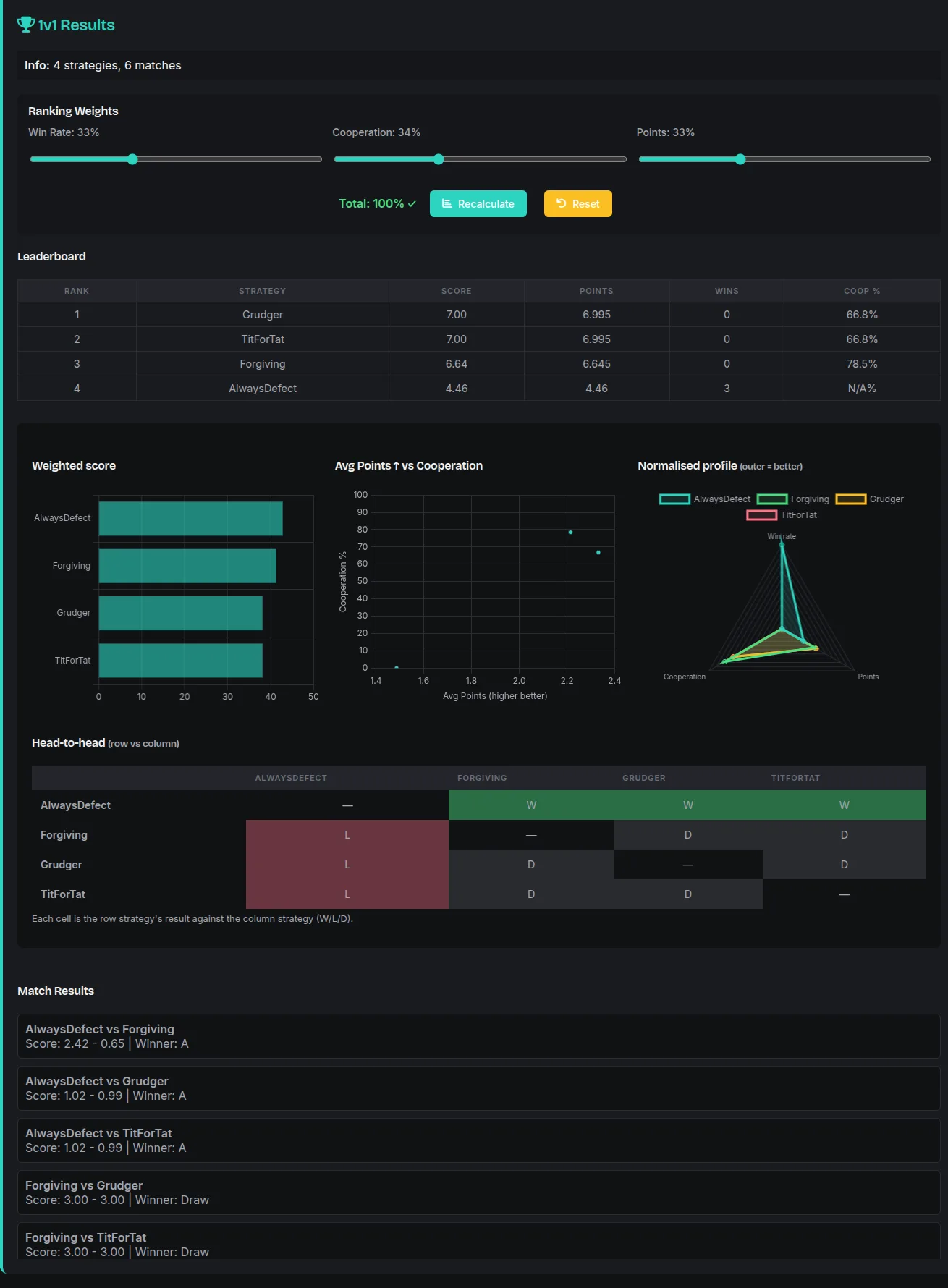
1v1 is Axelrod's format: round robin, every strategy against every other, head to head. This is where the classic results reproduce, and where students first discover that a strategy which never defects gets eaten alive and a strategy which always defects gets nothing from anyone.
N-Player puts everyone in one group and has them all move simultaneously, which breaks the intuitions built in 1v1. There is no single opponent to retaliate against, so "copy their last move" stops meaning anything obvious, and you have to decide what to do with opponents_histories yourself. Three payoff models are available: Public Goods, where cooperators pay into a pot that gets multiplied and split evenly; Pairwise Matrix, which decomposes the group into every pair and sums the ordinary two-player payoffs; and a K-Cooperator tensor, where your payoff depends on exactly how many of the others cooperated.
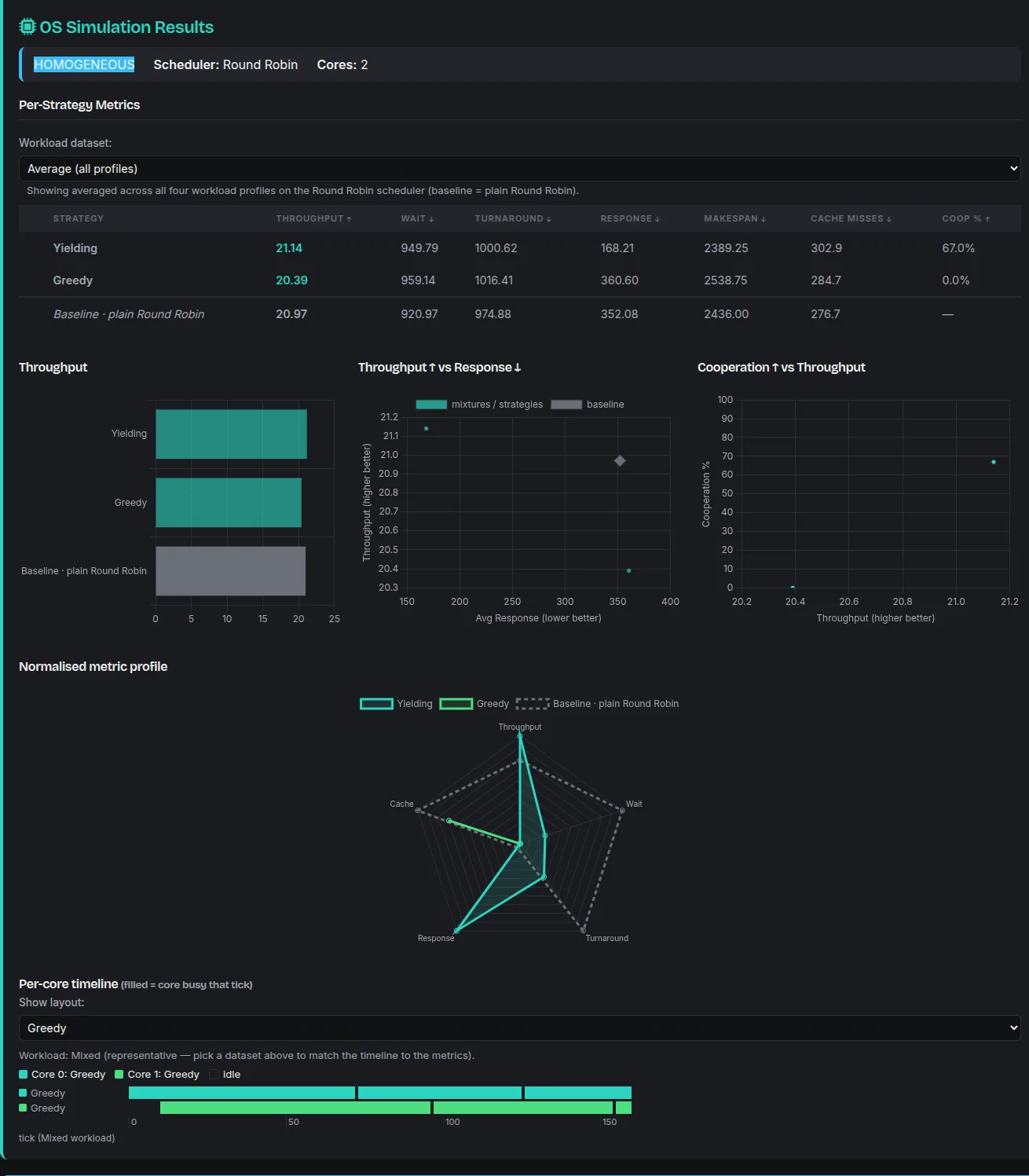
OS Simulation reinterprets the same function as a CPU scheduler. Cooperating means yielding the processor, defecting means holding onto it, and your strategy is scored on how well it runs a simulated multi-core machine against the metrics an operating systems course actually cares about. It is the same two-move decision, and a strategy that was a decent citizen in the 1v1 tournament is often a terrible scheduler, which is a more interesting result than it first sounds.
How scoring works
Ranking strategies by raw points rewards whoever happened to play the most rounds, so the leaderboard uses a weighted score:
The three components default to weights of roughly a third each, and every one of them is normalized before it is weighted. is wins divided by games played, not wins outright. is cooperation as a fraction of your own moves. is your average points per round divided by the maximum payoff available in a single round, capped at 1.
The normalization is the whole point. Win rate is per opponent and points are per round, so playing a longer match or facing more opponents cannot inflate your position. Two strategies that behave identically rank identically regardless of how much of the tournament they saw.
The weights are adjustable with sliders on the results page, and the leaderboard re-sorts live. That is not a gimmick. Sliding cooperation to zero and watching a well-behaved strategy fall twelve places makes the point that "best" is a choice about what you are measuring, and it makes it faster than any lecture does.
Practicing against the class
Under Select Participants, the app shows every strategy it has fetched from the website, split into three groups: Players, which are classmates' submissions; Bots, which the instructor wrote; and Practice, which are worked examples. Tick whichever you want to face and run. Their code is read-only, so you compete against them without being able to edit them.
The roster is cached on disk after the first fetch, so once you have pulled it, practice keeps working on a train with no signal. Press Refresh Gallery when you want the latest.
There is no cap on how many strategies you add to a run. If a run is going to be large the app estimates the time before starting it, on the theory that a number up front is better than a spinner and a guess.
Submitting
Submission goes through the Hub tab, and the first thing that happens is that your own machine tries to reject your strategy. The local app screens the code with the same AST-based check the server uses, then runs it in a short test match against a fixed opponent. An illegal import, a name that doesn't match the function, a crash on round one, a branch that returns None: all of it surfaces locally, in about a second, with an error that tells you which of those it was.
Only after both checks pass does the app hand off to the website, opening the submission page with your strategy prefilled. You log in there and confirm. Login and submission happen on the website, never in the local app, which is why the local app holds no credentials at all.
The website then re-screens everything anyway. Not as a backup, but because it has to: the local check runs on a machine the student controls and can be bypassed by anyone willing to spend ten minutes on it. The server-side screen is the one that counts, and it runs on every path that ingests code, including the admin ones. The local check exists purely so that honest mistakes fail fast and close to the person who made them.
Strategy names have to be unique across the class, since the results page identifies entries by name.
For instructors
Running the official tournament is the same practice flow with the real roster, followed by Submit results to website. That stages the result on the server and opens a review page where you publish immediately or schedule a reveal time, which is useful when you want everyone to see the standings at once rather than whenever the run finished. Any strategies that existed only on your machine get registered as bots on publish, deduplicated by a hash of their code so re-running a tournament doesn't create duplicates.
Bots and practice strategies are managed from the admin dashboard on the website.
Where the code is
Both halves are Flask. ipd-app holds the engine: the round robin, the N-player simulation, the payoff models, the OS scheduler simulation, and the sandbox. ipd-hub is Firebase-backed and holds every secret; the local app has none, and its firebase_config.py and auth_utils.py are deliberately no-op stubs so that the hosted code paths cannot accidentally come alive on a student's laptop.
If you're setting this up for your own course, the piece worth stealing is the split rather than the simulation. Pushing computation to the client and treating the client as hostile is more work than trusting it, but it is the only version that stays free to run and honest about what it is checking.
